# Java
### Java Versions
| Minecraft | Download Page | Linux Shell Command |
| ----------- | ---------------------------------------------------------------------------------------------------------------------------------------------- | --------------------------------- |
| **<= 1.15** | [Java 8](https://adoptium.net/?variant=openjdk8\&jvmVariant=hotspot) | `sudo apt install openjdk-8-jdk` |
| **1.16** | [Java 8](https://adoptium.net/?variant=openjdk8\&jvmVariant=hotspot) OR [Java 11](https://adoptium.net/?variant=openjdk11\&jvmVariant=hotspot) | `sudo apt install openjdk-11-jdk` |
| **1.17** | [Java 16](https://adoptium.net/?variant=openjdk16\&jvmVariant=hotspot) | `sudo apt install openjdk-16-jdk` |
| **1.18+** | [Java 17](https://adoptium.net/?variant=openjdk17\&jvmVariant=hotspot) | `sudo apt install openjdk-17-jdk` |
| **1.21+** | [Java 21](https://adoptium.net/temurin/releases/?variant=openjdk21\&jvmVariant=hotspot) | `sudo apt install openjdk-21-jdk` |
On the download page sort for your **Operating System** and your **Architecture** (This should typically be **x64**)
Other Java Download Links
[Amazon Corretto](https://aws.amazon.com/corretto/), [Azul Zulu](https://www.azul.com/downloads/?package=jdk#zulu), or [Oracle JDK](https://www.oracle.com/java/technologies/downloads/archive/)
***
### Java Arguments
These can help both server and client with performance in,
* Reducing Ram Usage. (*GC will clean up more efficiently*)
* Reduced Lag Spikes. (*GC will clean more frequently, reducing large lag spikes*)
#### Client Arguments
These can be set in your **Launcher**
Curseforge Launcher
If you’re using the Curseforge Launcher, open your **Settings**, choose **Minecraft** and scroll down to these Settings. [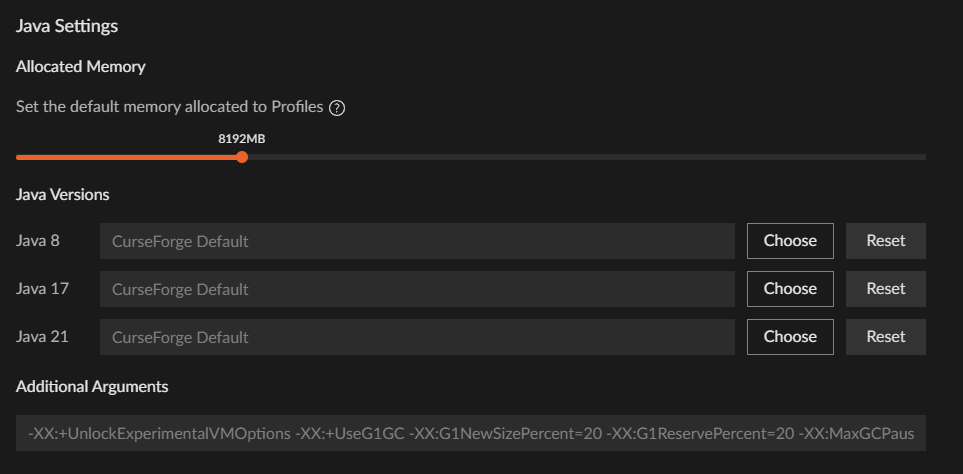](https://allthemods.github.io/alltheguides/help/img/CurseforgeJVM.png)
ATLauncher
Open your pack **Settings**, click **Java/Minecraft** and put your args into the big `Java Parameters` box. [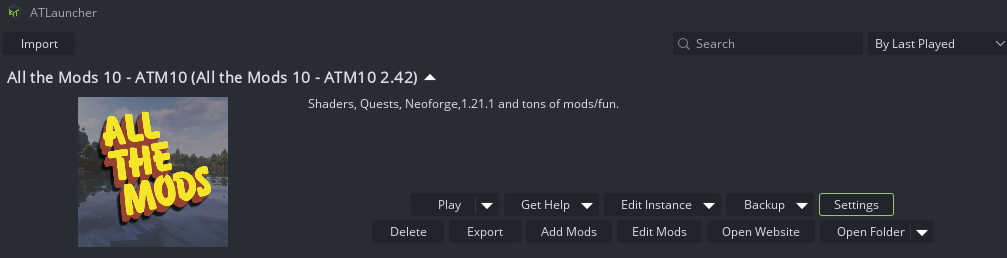](https://allthemods.github.io/alltheguides/help/img/javaAT1.png) [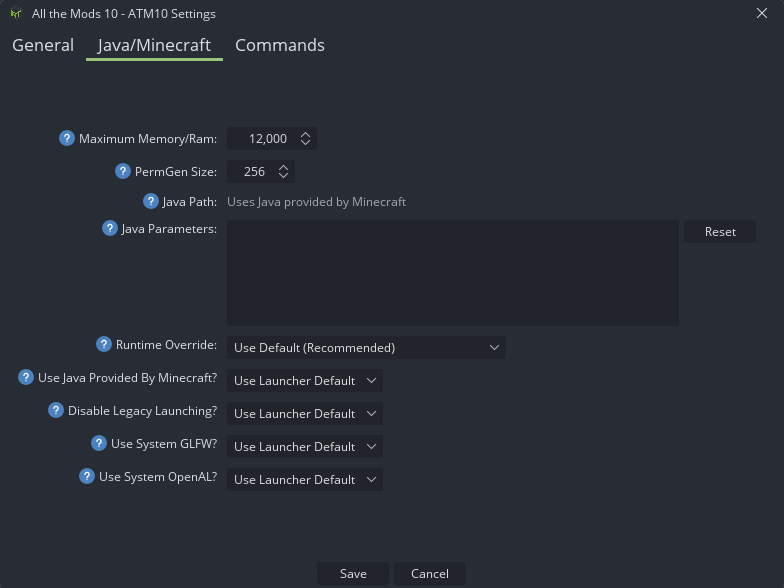](https://allthemods.github.io/alltheguides/help/img/javaAT2.png)
Default Java 8-11 Client Arguments
```
-XX:+UseG1GC -XX:+ParallelRefProcEnabled -XX:MaxGCPauseMillis=200 -XX:+UnlockExperimentalVMOptions -XX:+DisableExplicitGC -XX:+AlwaysPreTouch -XX:G1NewSizePercent=30 -XX:G1MaxNewSizePercent=40 -XX:G1HeapRegionSize=32M -XX:G1ReservePercent=20 -XX:G1HeapWastePercent=5 -XX:G1MixedGCCountTarget=4 -XX:InitiatingHeapOccupancyPercent=15 -XX:G1MixedGCLiveThresholdPercent=90 -XX:G1RSetUpdatingPauseTimePercent=5 -XX:SurvivorRatio=32 -XX:+PerfDisableSharedMem -XX:MaxTenuringThreshold=1 -Dusing.aikars.flags=https://mcflags.emc.gs -Daikars.new.flags=true
```
Default Java 17+ Client Arguments
```
-XX:+UnlockExperimentalVMOptions -XX:+UseG1GC -XX:G1NewSizePercent=20 -XX:G1ReservePercent=20 -XX:MaxGCPauseMillis=50 -XX:G1HeapRegionSize=32M
```
Default Java 21 Client Arguments
```
-XX:+UnlockExperimentalVMOptions -XX:+UseG1GC -XX:G1NewSizePercent=20 -XX:G1ReservePercent=20 -XX:MaxGCPauseMillis=50 -XX:G1HeapRegionSize=32M
```
Java 21 Client Arguments | If you have lots of ram (12GB+), try ZGC
```
-XX:+UseZGC -XX:+ZGenerational -XX:+DisableExplicitGC -XX:+AlwaysPreTouch -XX:+PerfDisableSharedMem -XX:+UseDynamicNumberOfGCThreads
```
***
#### Server Arguments
These are set in the `user_jvm_args.txt` file in your server folder
Java 17 Server Arguments
```
-Xms4G -Xmx6G -XX:+UseG1GC -XX:+ParallelRefProcEnabled -XX:MaxGCPauseMillis=200 -XX:+UnlockExperimentalVMOptions -XX:+DisableExplicitGC -XX:+AlwaysPreTouch -XX:G1NewSizePercent=30 -XX:G1MaxNewSizePercent=40 -XX:G1HeapRegionSize=8M -XX:G1ReservePercent=20 -XX:G1HeapWastePercent=5 -XX:G1MixedGCCountTarget=4 -XX:InitiatingHeapOccupancyPercent=15 -XX:G1MixedGCLiveThresholdPercent=90 -XX:G1RSetUpdatingPauseTimePercent=5 -XX:SurvivorRatio=32 -XX:+PerfDisableSharedMem -XX:MaxTenuringThreshold=1
```
Java 21 Server Arguments
```
-Xms4G -Xmx6G -XX:+UnlockExperimentalVMOptions -XX:+UseG1GC -XX:G1NewSizePercent=20 -XX:G1ReservePercent=20 -XX:MaxGCPauseMillis=50 -XX:G1HeapRegionSize=32M
```
Java 21 Server Arguments | For fast CPUs with 4+ cores & lots of ram (8-12GB), try ZGC:
```
-Xms8G -Xmx12G -XX:+UseZGC -XX:+ZGenerational -XX:SoftMaxHeapSize=10g -XX:+DisableExplicitGC -XX:+AlwaysPreTouch -XX:+PerfDisableSharedMem -XX:+UseDynamicNumberOfGCThreads
```
---
# Agent Instructions: Querying This Documentation
If you need additional information that is not directly available in this page, you can query the documentation dynamically by asking a question.
Perform an HTTP GET request on the current page URL with the `ask` query parameter:
```
GET https://allthemods.gitbook.io/guides/general/java.md?ask=
```
The question should be specific, self-contained, and written in natural language.
The response will contain a direct answer to the question and relevant excerpts and sources from the documentation.
Use this mechanism when the answer is not explicitly present in the current page, you need clarification or additional context, or you want to retrieve related documentation sections.